
Swish Integration for Cable Park & Waterski Club Booking | Wakeque
Activate Swish in your Stripe account and Swedish customers can pay for sessions in seconds in Wakeque, no card details needed.
Published on March 22, 2024 Updated on March 30, 2026
About Swish
Swish is the dominant payment provider in Sweden with more than 7 million users spanning across various stores and online platforms. Swish is quick, simple, and secure, and you can offer it in Wakeque through Stripe.
Wakeque takes payments through Stripe, and Stripe supports Swish. Once you activate Swish in your Stripe account, your customers can pay for their wakepark bookings directly through the Swish app.
With Swish, your customers can now pay for their bookings with just a few taps – without the need to input their credit card details or bank account information.
Swish is a safe and reliable way to pay, and it is available to everyone with a Swedish mobile number. So if you're in search of a simple and secure payment method for your wakepark bookings, look no further than Wakeque with Swish.
Benefits of using Swish with Wakeque
- User-friendly: Swish is a simple and convenient payment method that allows your customers to pay for their wakepark bookings with just a few taps.
- Secure: Swish is a safe and reliable payment method that ensures the security of your customers' transactions.
- Quick: With Swish, your customers can make payments quickly and easily, without the need to input their credit card details or bank account information.
- Convenient: Swish is available to everyone with a Swedish mobile number, making it a convenient payment method for your customers.
- Automatic refunds: If you need to refund a customer, you can do so directly through Wakeque, and the refund is sent back through Stripe to the customer's Swish account.
How to integrate Swish with Wakeque
- Make sure you have installed Stripe
- Go to your Stripe Payment methods and enable Swish.
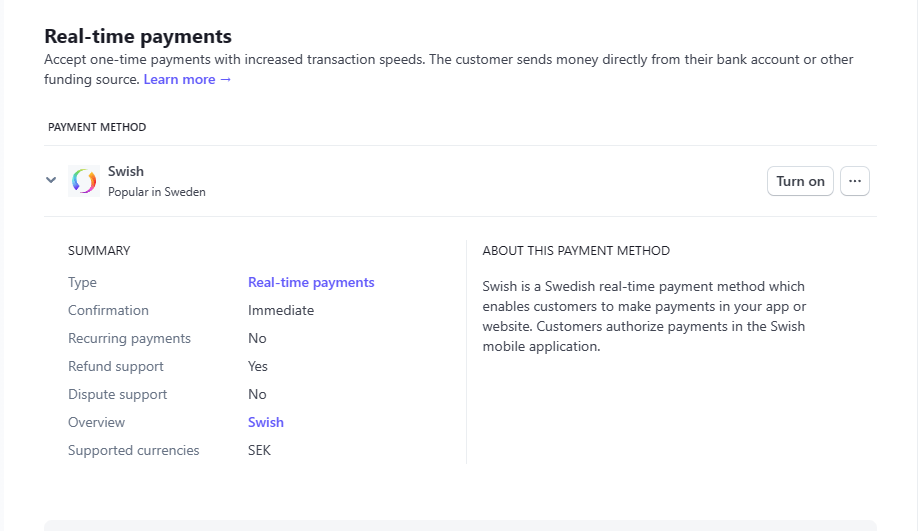
- After you have enabled Swish it takes a couple of minutes for the changes to take effect. After that, you can start using Swish as a payment method in Wakeque.
- Test the payment method by making a booking in Wakeque and selecting Swish as the payment method. This is how it should look like on the checkout page:
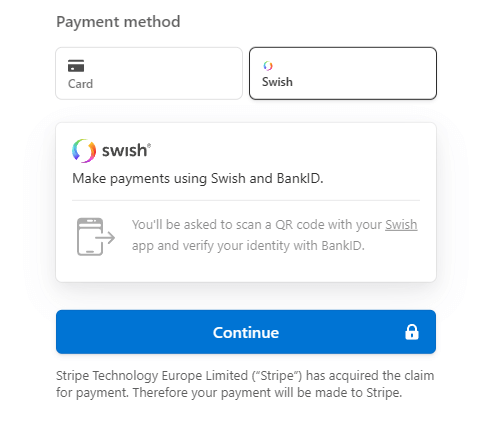
- You customers can now checkout using Swish as a payment method.